
Jackery Error Code List: The Complete 2026 Troubleshooting Guide
I’ve dug through the official troubleshooting docs, user manuals, and support threads to pull together one clear, no-nonsense guide that actually explains what each code means, why it shows up, and how to fix it without needing an engineering degree. Think of this as your cheat sheet for whenever your power station decides to get dramatic.
What Is a Jackery Error Code, Anyway?
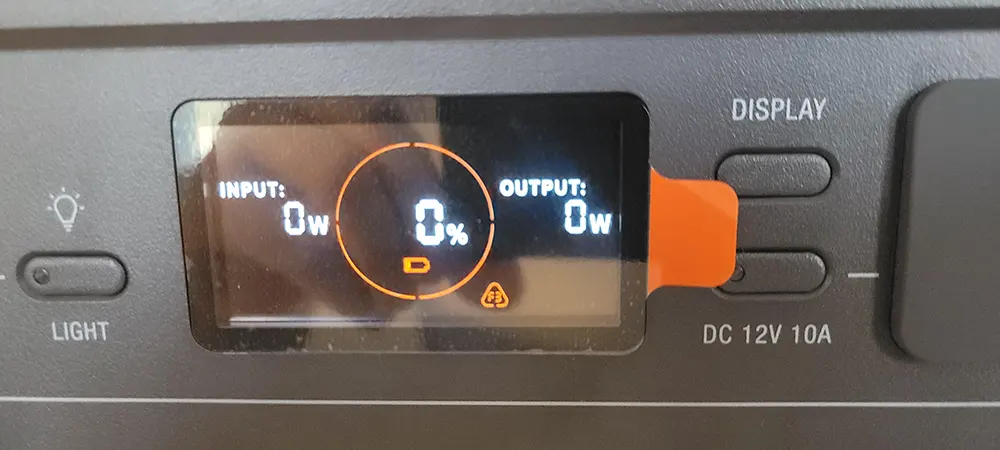
Jackery Error Code List – Before we dive into the actual Jackery error codes list, let’s talk about what these codes are even for. Your power station isn’t trying to annoy you. It’s actually trying to protect itself (and you) by flagging something that’s outside normal operating conditions.
Think of it like a car’s check-engine light. It’s not always a five-alarm emergency; sometimes it’s just the system saying, “Hey, something’s a little off; let’s pause before this becomes a real problem.” A Jackery error code works the same way. It’s a built-in safety net that stops the unit before overheating, overcharging, or a short circuit turns into something worse.
Why Understanding the Jackery Error Codes List Matters
Here’s the thing: most people panic the second they see an error code, assuming their expensive power station is dead. But knowing your way around a Jackery error codes list can save you a shipping fee, a support ticket, and a few days of waiting around.
Some codes are genuinely serious and mean you should stop using the unit and contact support. Others are just the equivalent of your power station clearing its throat. Being able to tell the difference is the whole point of this guide.
Jackery Best Portable Solar Generators: 2026 Tested Comparison
The Complete Jackery Error Codes List (F-Series)
Most Jackery Explorer models—including the Explorer 1000, 1000 Pro, 1500, and 2000 Pro—use a standardized F0 through F9 fault code system. This is the backbone of the official Jackery error codes list, and it’s worth memorising the basics even if you never plan on opening up your unit.
F2 – Charging Module Communication Failure
This one pops up when the charging module can’t “talk” to the rest of the system properly. It’s a bit like a phone call that keeps dropping; the connection exists, but the message isn’t getting through cleanly. Unplug your charging source, wait a minute, and reconnect. If F2 keeps reappearing, that’s your cue to contact Jackery support.
F3 – Battery Failure
F3 is one of the more serious entries on the Jackery error codes list. It generally points to an internal battery issue rather than something you plugged in wrong. Don’t try to force a fix here; this is a “stop and call support” situation.
F4 – Battery Overvoltage
This shows up when the battery has received more voltage than it’s rated to handle, usually from an incompatible charger or solar panel. If you’ve been mixing and matching accessories from different brands, this is often the culprit. Stick to Jackery-certified chargers and panels to keep your input voltage within spec.
F5 – Battery Undervoltage
The opposite problem: the battery voltage has dropped below the safe threshold, often from deep discharging or long-term storage without a top-up. Recharge fully using the AC adapter and see if the code clears. If it doesn’t, the battery cells may need professional evaluation.
F6 – Inverter Abnormal
An inverter issue usually means something is off with how your power station converts DC battery power into the AC power your devices actually use. Jackery’s own guidance here is straightforward: remove the load or unplug the charging cable first. In many cases, the unit resets itself once the load is gone.
F7 – Power Supply Module Abnormal
This code flags a problem in the power supply module itself. Unlike some of the milder codes on this Jackery error codes list, F7 typically requires reaching out to after-sales support rather than attempting a home fix.
F8 – Charge/Discharge Overcurrent or Short Circuit
Picture trying to squeeze a garden hose’s worth of water through a drinking straw; that’s basically what’s happening electrically when F8 appears. Too much current is trying to flow at once, or there’s a short somewhere in the circuit. Disconnect everything, inspect your cables for damage, and try again with a lighter load.
F9 – DC Output Overcurrent or Short Circuit
Similar story to F8, but specific to the DC output ports. Remove the connected load immediately. According to Jackery’s own documentation, the unit can often recover on its own once the overload is removed, but if it doesn’t bounce back, it’s time to contact support.
Temperature Warning Icons vs Error Codes
Not everything on the screen is technically part of the numbered Jackery error codes list. Temperature warnings show up as icons rather than letter-number combos, and they’re honestly some of the least scary things you’ll encounter.
A solid thermometer icon means the unit is charging or discharging at a temperature that’s too high. A hollow thermometer icon means the opposite; it’s too cold. Neither one is a malfunction. Your power station is simply being cautious, the same way your phone slows down charging in direct summer sun. Move the unit to a more moderate environment, give it 20-30 minutes, and it should resume normal operation on its own.
Power Your Home Smarter with Explorer 5000 Plus
Jackery Error Codes List by Model
Here’s where things get a little tricky: Jackery hasn’t used one single universal system across every generation of product. Newer and older lines sometimes label things slightly differently. Here’s a quick side-by-side so you’re not comparing apples to oranges.
| Model Series | Code Format | Common Triggers | Typical Fix |
|---|---|---|---|
| Explorer 1000 / 1000 Pro | F0–F9 | Battery, inverter, charging faults | Reset, remove load, and contact support for F0/F1/F3/F4/F7. |
| Explorer 1500 / 2000 Pro | F0–F9 + temp icons | Overcurrent, over/undervoltage | Same F-code protocol, plus temp icon monitoring |
| Newer Explorer/Portable Power Station lines | F-series (device-specific) | Communication or module faults | Soft reset first; hard reset if the issue persists. |
| Solar panel accessories | No dedicated code | Cracked cells, loose MC4 connectors | Visual inspection, multimeter voltage check |
If your specific model isn’t showing exactly what you expected from this Jackery error codes list, your best bet is always the printed user manual that came in the box; it’s tailored to your exact unit’s firmware.
1. Jackery Error Code List Description
| Error Code | Name | Description (For Internal Fault Maintenance Only) |
|---|---|---|
| F0 | BMS Data Communication Error |
Data communication fault between the BMS and mainboard |
| F1 | Inverter Data Communication Error |
Data communication fault between the inverter and mainboard |
| F2 | DC Input Data Communication Error |
Data communication fault between the DC charging module and BMS |
| F3 | BMS or Battery Failure | BMS or battery failure |
| F4 | Battery Overvoltage | Battery overvoltage |
| F5 | Battery Undervoltage | Battery Undervoltage |
| F6 | Inverter Failure | AC output overcurrent/overload/short circuit; Grid input overvoltage / undervoltage / overfrequency / underfrequency; Inverter over-temperature protection on (triggered) Insulation detection failure |
| F7 | DC Input Failure | PV input overvoltage; DC charging module overtemperature protection on/triggered; Output overcurrent protection of the DC charging module on/triggered |
| F8 | Battery Charging / Discharging Overcurrent / Short Circuit |
BMS overcurrent/short circuit protection on/triggered |
| F9 | DC Output Overcurrent / Short Circuit |
USB short circuit protection on/triggered |
2. Troubleshooting HomePower 3600 Plus/Max/1000 Plus V2/Other Jackery Explorer
| Error Code | Corrective Measures |
|---|---|
| F0/F1 | Restart the product. |
| F2/F3 | Restart the product. |
| F4 | Connect the product to loads to discharge its battery until the fault disappears. |
| F5 | Charge the product via solar panels or an AC wall outlet until the fault disappears. |
| F6 | 1. Wait for the grid to normalize before charging the product via the AC wall outlet. 2. Check whether the air intake and exhaust vents are blocked; ensure 30 cm clearance on both sides of the product. 3. Place the product in a location that is not exposed to direct sunlight or high environmental temperatures. 4. Disconnect all loads from the product. Keep the product idle and wait until the fault disappears. 5. Restart the product. |
| F7 | 1. Remove all DC inputs from the product. 2. Check the open-circuit voltage (Voc) of the connected solar panels. The product allows a maximum DC input voltage of 60V. 3. Restart the product and keep it idle. Wait until the fault disappears. |
| F8 | Contact Jackery Customer Support. |
| F9 | Remove the load connected to the USB ports of the product. Wait until the fault disappears. |
| FA | 1. Turn off the AC output of both units. 2. Press the AC power button on each unit again within 1 minute. |
| FC | 1. Restart the battery packs and the HP3600 Plus, respectively. 2. If the fault persists, disconnect the battery pack from the HP3600 Plus and connect it again. |
| FE | Contact Jackery Customer Support. |
In order to respond to the feedback quickly, we set up common fault codes F1, F2, and F3 in the system: If any codes appear, please remove the load or unplug the charging plug; the product can restore itself. If not, please contact after-sales service.
How to Reset a Jackery Power Station When an Error Code Pops Up
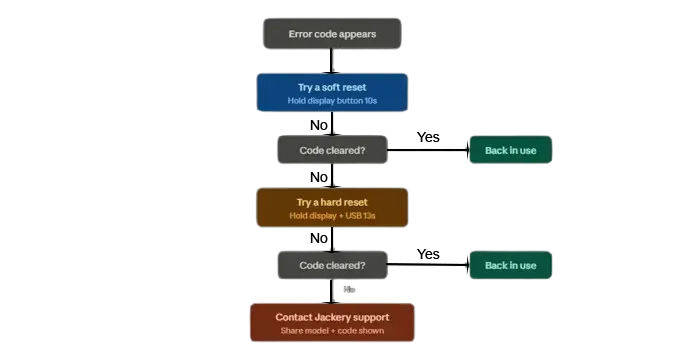
Nine times out of ten, a reset is the first thing worth trying before you assume the worst. It’s the electronic equivalent of turning something off and back on again, and it genuinely resolves a huge chunk of Jackery error code situations.
Soft Reset Method
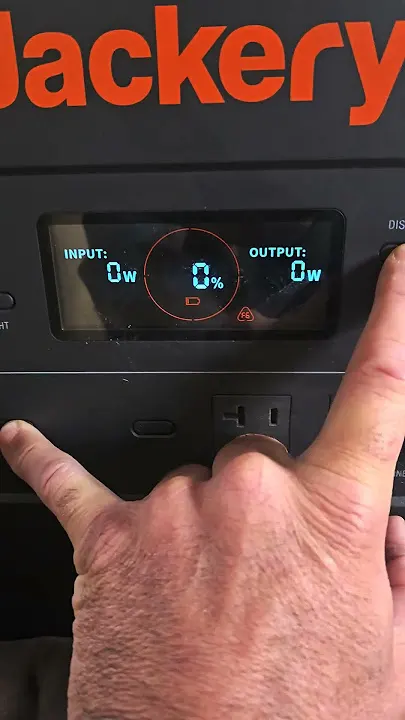
For most Explorer models, press and hold the display button for about 10 seconds. This clears minor glitches without wiping any settings. It’s quick, painless, and should always be your first move.
Hard Reset Method
If the soft reset doesn’t do the trick, a hard reset is the next step. On Explorer 1000 Pro, 1500, and 2000 Pro models, hold the Display and USB buttons together for roughly 13 seconds. Alternatively, you can drain the battery completely and then charge it back up to full; a full discharge-recharge cycle often clears stubborn fault memory that a quick reset can’t touch.
Common Jackery Error Code Triggers You Can Avoid
Let’s be honest, a lot of these codes are self-inflicted, and I say that with love. Here are the usual suspects:
- Using a third-party charger or solar panel that isn’t rated correctly for your unit
- Overloading the output ports with devices that draw more wattage than the station supports
- Leaving the unit in direct sun or a freezing car trunk for extended periods
- Storing the battery at very low charge for long stretches without topping it up
- Loose or damaged cables that create intermittent connections
None of these are complicated fixes, but they’re exactly why the Jackery error codes list exists in the first place; most issues trace back to something environmental or accessory-related rather than a hardware defect.
When to Contact Jackery Support Instead of DIY Fixing
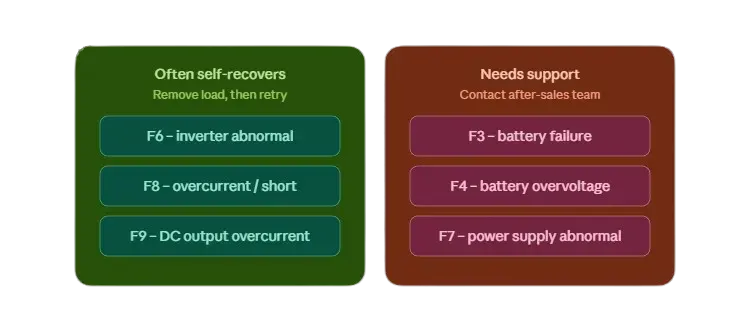
Here’s a rule of thumb I always give people: if a reset and a cooldown period don’t clear the code, stop troubleshooting on your own. Codes like F0, F1, F3, F4, and F7 specifically call for after-sales support according to Jackery’s own documentation. There’s no shame in calling in the professionals; trying to force-fix an internal battery or inverter issue yourself can void your warranty or, worse, create a safety hazard.
When you do reach out, have your order number, model name, and the exact error code ready. It speeds things up dramatically and usually gets you a faster resolution than starting from scratch on the phone.
Preventive Maintenance Tips to Keep Error Codes Away
Prevention really is easier than the cure here. A few habits go a long way toward keeping your unit off this Jackery error code list entirely:
- Charge and store your power station between 20% and 80% when it’s not in active use
- Avoid extreme temperature environments whenever possible
- Only use Jackery-branded or explicitly compatible chargers and panels
- Give your unit a full charge cycle every few months if it’s sitting in storage
- Keep the vents clear of dust so the internal cooling system isn’t working overtime
Treat your power station like you would a car battery; a little routine care prevents most of the drama.

Do Jackery Error Codes Mean Permanent Damage?
Not usually, and this is honestly the question I get asked the most. The vast majority of codes on the Jackery error code list are protective triggers, not indicators of permanent failure. Codes tied to temperature or overcurrent almost always self-resolve once the triggering condition is removed. It’s really only the battery-specific and power-module codes (F3, F4, F7) where you’re looking at something that might need professional attention.
Jackery Stores
| USA | United Kingdom | Germany | Canada |
|---|---|---|---|
 |
 |
 |
 |
| View Special Offers | View Special Offers | View Special Offers | View Special Offers |
Final Thoughts on the Jackery Error Code List
At the end of the day, a Jackery error code isn’t something to lose sleep over. It’s your power station doing exactly what it’s designed to do: protecting itself and you from something that’s temporarily out of balance. Whether it’s a simple temperature icon or a more serious F-series fault, working through this Jackery error codes list step by step will get you back up and running in most cases without ever needing to pick up the phone.
And when you do need support, you’ll walk into that conversation already knowing what’s going on, which honestly makes the whole process a lot less stressful.
Read: EcoFlow Error Codes Decoded: List & Fix Guide (2026) and Bluetti Error Code: Complete List & Easy Fixes (2026)
FAQs About Jackery Error Code List
F2 indicates a charging module communication failure. Try disconnecting and reconnecting your charging source; if it persists, contact Jackery support.
Many codes, especially those related to overcurrent, overload, or temperature, can be resolved with a simple reset or by removing the connected load. Battery-related codes like F3 or F4 usually need professional attention.
Temperature warnings use icons rather than the F-series codes because they're a separate protective feature, not a fault. They clear automatically once the unit returns to a normal operating temperature range.
For most Explorer 1000 Pro, 1500, and 2000 Pro models, hold the Display and USB buttons together for about 13 seconds, or fully discharge and then recharge the battery.
Mostly, yes — the F0 through F9 system is used broadly across Explorer models, though newer product lines occasionally introduce slight variations. Always cross-check with your specific model's user manual for confirmation.
You Might Also Like